
Is the title box always too small for your blog posts? Do you find yourself wishing you could add more details or catchy copy to your blog post titles? Are you tired of adding header tags to the subheadings you create for your blog posts? Or perhaps you just want subheadings that appear directly beneath the title of your live blog posts rather than at the top of the body copy?
If you answered ‘yes’ to any of the above questions, then the SubHeading WordPress plugin is for you!
I tried this plugin for the first time recently, and I love it. It’s useful for clarifying a catchy blog post title or adding some keywords for an SEO boost. You can see it in action on a live blog post below:

And here it is on a blog home page:
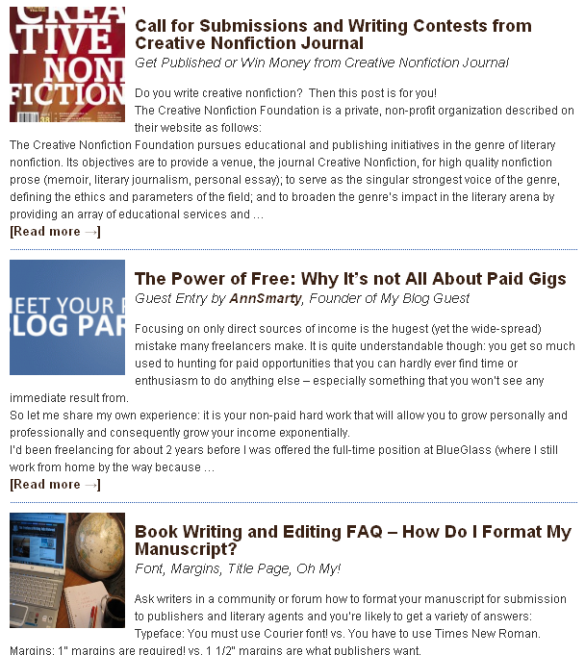
Looks good, don’t you think?
The SubHeading plugin is available for free from the WordPress Plugin Directory (just search by “subheading” or by the plugin author’s name from your WordPress dashboard’s plugin installation page or download the SubHeading plugin from the WordPress Plugin Directory.
Once installed, you can follow the SubHeading plugin installation instructions and configure the settings so subheadings are allowed on posts and pages, display in your blog’s RSS feed, and more, as shown below in the SubHeadings Settings configuration page:
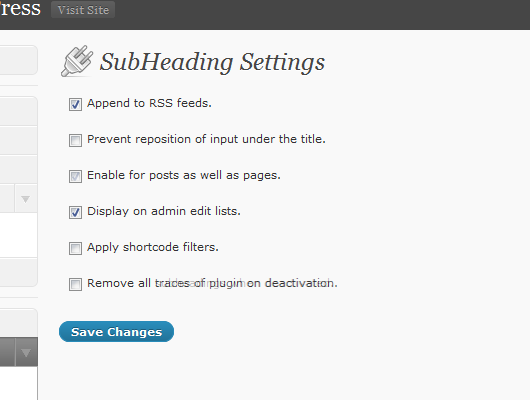
Once the plugin is installed and configured, a new area appears in your blog post editor where you can enter a subheading for that post beneath the title box, as shown below:
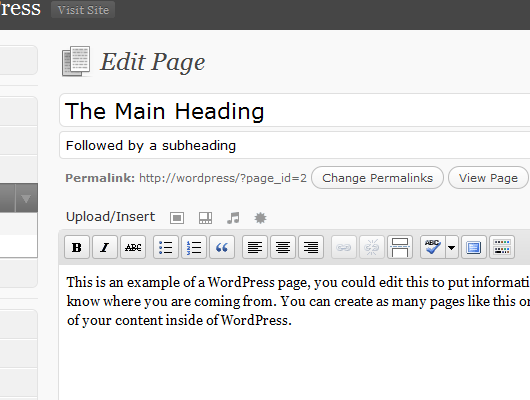
It’s that easy! What do you think? Leave a comment and share your thoughts.

 When was the last time you read your blog’s About page? It’s easy to forget that page when you’re busy writing fresh blog posts, but your About page is one of the most important destinations on your blog. When visitors land on a post in your blog, they’re likely to read the content, possibly click through to read some more posts if they like what they found, and then what do you think they do? They check out your About page to see who is behind all of this great content!

 Everyone knows what being a blogger entails but fewer people know what creating a successful blog involves. Far too many bloggers have fallen for the false mantra of “If you write it, they will come” only to watch their traffic, readership and even profits lag behind their efforts.
 Did you know that sites which load quickly get higher search engine keyword rankings thereby getting more search traffic to their sites than slow-loading sites? It’s true for your blog, too. Even Google has admitted that fast load times equate to higher search rankings. However, most bloggers haven’t taken the time to evaluate their blogs’ load times.
 If you want to grow your blog’s audience and you use WordPress.org as your blogging application, then you need to try the five WordPress plugins listed below. They’re easy to use, free, and can have a significant impact on the number of visitors to your blog.